


कॉन्सेप्ट से क्लाउड आर्किटेक्चर तक सेकंडों में
🔥 अपने क्लाउड सिस्टम के बारे में सरल अंग्रेजी में वर्णन करने की कल्पना करें—और 30 सेकंड से कम समय में पेशेवर, UML-संगत डेप्लॉयमेंट डायग्राम प्राप्त करें।
अब तक ड्रैग करने, समायोजित करने या अनुमान लगाने की आवश्यकता नहीं है।
अब तक गलत लेबल वाले नोड्स या गायब फायरवॉल्स की समस्या नहीं होगी।
बस स्मार्ट, सटीक और तुरंत डेप्लॉय करने योग्य आर्किटेक्चर विज़ुअलाइज़ेशन—AI द्वारा संचालित।
सिस्टम डिज़ाइन के भविष्य में स्वागत है।
इस व्यापक, चरण-दर-चरण ट्यूटोरियल, हम आपको जो कुछ भी जानने की आवश्यकता है, उसके बारे में चर्चा करेंगे UML डेप्लॉयमेंट डायग्राम्स, उनके महत्व के बारे में, उनका उपयोग कब करना चाहिए, उनसे किसे लाभ होता है—और कैसे विजुअल पैराडाइग्म के AI डेप्लॉयमेंट डायग्राम जनरेटर पूरी प्रक्रिया को स्वचालित करता है।
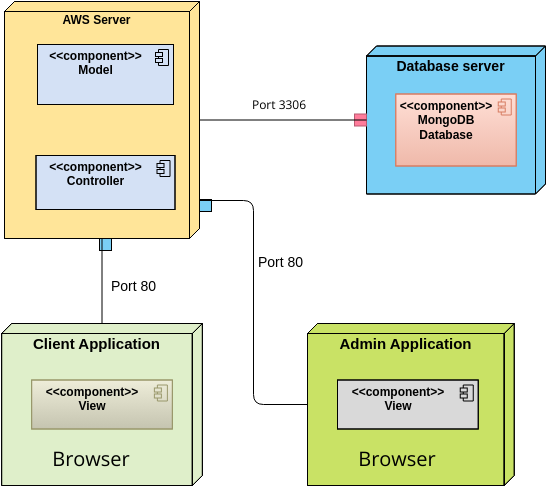
अंत तक, आप मिनटों में उत्पादन-ग्रेड डेप्लॉयमेंट डायग्राम्स को डिज़ाइन, सत्यापित और साझा करने में सक्षम होंगे—दिनों के बजाय।
📌 UML डेप्लॉयमेंट डायग्राम क्या है?
एक UML डेप्लॉयमेंट डायग्राम एक संरचनात्मक डायग्राम यूनिफाइड मॉडलिंग भाषा (UML) में है जो भौतिक (रनटाइम) आर्किटेक्चर एक सॉफ्टवेयर सिस्टम का है।
यह महत्वपूर्ण सवाल का उत्तर देता है:
“यह सिस्टम कहाँ चलता है—और इसके हिस्से कैसे जुड़े हैं?”
कंपोनेंट या क्लास डायग्राम के विपरीत (जो तर्क पर केंद्रित हैं), डेप्लॉयमेंट डायग्राम दिखाते हैं:
-
हार्डवेयर (सर्वर, उपकरण, IoT नोड),
-
सॉफ्टवेयर वातावरण (VMs, कंटेनर, OS, रनटाइम),
-
डेप्लॉय किए गए आर्टिफैक्ट्स (eksekutables, लाइब्रेरी, कॉन्फ़िग फ़ाइलें),
-
संचार मार्ग (नेटवर्क, प्रोटोकॉल),
-
और सुरक्षा सीमाएँ (फायरवॉल, गेटवे)।
✅ उपयोग केस: क्लाउड सिस्टम, वितरित एप्लिकेशन, माइक्रोसर्विसेज, एम्बेडेड सिस्टम और हाइब्रिड इंफ्रास्ट्रक्चर के लिए आदर्श।
🔗 पूरी परिभाषा और उद्देश्य सीखें: डेप्लॉयमेंट डायग्राम क्या है? UML डेप्लॉयमेंट डायग्राम्स का पूरा गाइड
🧩 डेप्लॉयमेंट डायग्राम के मुख्य तत्व (उदाहरणों के साथ समझाए गए)
आइए मूल निर्माण ब्लॉक्स को तोड़ें—ताकि आपको पता चले कि क्या शामिल करना है और उन्हें सही तरीके से मॉडल कैसे बनाना है।
| तत्व | वर्णन | उदाहरण |
|---|---|---|
| नोड | एक भौतिक या तार्किक गणना संसाधन। स्पष्टता के लिए स्टेरियोटाइप का उपयोग करें। | <<सर्वर>>, <<क्लाउड>>, <<उपकरण>>, <<कंटेनर>>, <<निष्पादन वातावरण>> |
| कृतिम | एक नोड पर डेप्लॉय किया गया सॉफ्टवेयर घटक (उदाहरण के लिए .जार, .एक्जेक्यूटेबल, .जेसॉन, .डॉकरफाइल) |
<<कृतिम>>, <<प per>>, <<विन्यास फ़ाइल>> |
| निर्माण संबंध | दर्शाता है कि कृतिम कहाँ चलता है। बिंदीदार तीर के साथ <<डेप्लॉय>> स्टीरियोटाइप। |
<<डेप्लॉय>> से ऑर्डर सर्विस.जार तक <<सर्वर>> |
| संचार लिंक | नोड्स के बीच भौतिक या तार्किक संबंध। प्रोटोकॉल स्टीरियोटाइप का उपयोग करें। | <<टीसीपी/आईपी>>, <<HTTPS>>, <<WebSocket>> |
| नेस्टेड नोड्स | हिरार्किकल संरचना (उदाहरण के लिए, कंटेनर वीएम के भीतर, वीएम भौतिक सर्वर के भीतर). | AWS EC2 इंस्टेंस के भीतर कुबरनेटीस क्लस्टर |
| निर्भरताएँ | रनटाइम निर्भरता दिखाने वाली डैश्ड तीर (उदाहरण के लिए, एप्लिकेशन को डेटाबेस की आवश्यकता होती है). | <<निर्भरता>>वेब सेवा से डेटाबेस तक |
💡 प्रो टिप: हमेशा उपयोग करें स्टेरियोटाइप्स—वे आरेखों को तुरंत पठनीय और टीमों के बीच मानकीकृत बनाते हैं।
🔗 इन तत्वों को मॉडल करने का तरीका देखें: UML में डेप्लॉयमेंट डायग्राम कैसे बनाएं: स्टेप-बाय-स्टेप ट्यूटोरियल
🕒 आपको डेप्लॉयमेंट डायग्राम का उपयोग कब करना चाहिए?
डेप्लॉयमेंट डायग्राम का उपयोग करें जब आप आर्किटेक्चरल प्रश्नों के उत्तर देना चाहते हैं जैसे:
-
सिस्टम कहाँ चलता है—ऑन-प्रिमाइस, क्लाउड में, या एज डिवाइस पर?
-
घटकों को कैसे जोड़ा जाता है (API के माध्यम से, मैसेज क्यू, सीधे डेटाबेस एक्सेस के माध्यम से)?
-
कौन से हार्डवेयर या सॉफ्टवेयर वातावरण शामिल हैं (उदाहरण के लिए, कुबरनेटीस, डॉकर, AWS EC2)?
-
हम उच्च उपलब्धता, फेलओवर या सुरक्षा कैसे सुनिश्चित करते हैं?
-
रनटाइम का हिस्सा कौन सा मिडलवेयर (उदाहरण के लिए, काफ्का, रेडिस, एनजीइनएक्स) है?
✅ सबसे अच्छा है:
क्लाउड-नेटिव सिस्टम (AWS, Azure, GCP)
माइक्रोसर्विसेज और वितरित आर्किटेक्चर
एम्बेडेड सिस्टम (IoT, रोबोटिक्स)
हाइब्रिड या मल्टी-रीजन डेप्लॉयमेंट
सुरक्षा और सुगंध योजना (फायरवॉल, WAFs, एन्क्रिप्शन क्षेत्र)
🔗 वास्तविक दुनिया के उपयोग के मामलों का अन्वेषण करें: सॉफ्टवेयर डिज़ाइन हैंडबुक में डेप्लॉयमेंट डायग्राम
👥 डेप्लॉयमेंट डायग्राम किसके द्वारा उपयोग किए जाते हैं? (और क्यों उन्हें AI की आवश्यकता होती है)
| भूमिका | क्यों उन्हें डेप्लॉयमेंट डायग्राम की आवश्यकता होती है |
|---|---|
| सॉफ्टवेयर आर्किटेक्ट्स | स्केलेबल, सुरक्षित और रखरखाव योग्य सिस्टम डिज़ाइन करें |
| DevOps इंजीनियर | इंफ्रास्ट्रक्चर, CI/CD पाइपलाइन्स और डेप्लॉयमेंट रणनीतियों की योजना बनाएं |
| क्लाउड आर्किटेक्ट्स | क्लाउड लागत, उपलब्धता और नेटवर्क टोपोलॉजी को अनुकूलित करें |
| सुरक्षा टीमें | आक्रमण के सतहों की पहचान करें, फायरवॉल लगाएं, सेगमेंटेशन लागू करें |
| उत्पाद प्रबंधक | स्टेकहोल्डर्स को सिस्टम की जटिलता से जुड़ी जानकारी साझा करें |
| विकासकर्मी | समझें कि उनका कोड कहाँ चलता है और यह कैसे जुड़ता है |
🚨 समस्या: पारंपरिक मॉडलिंग धीमी, त्रुटिपूर्ण है और अपडेट करना कठिन है।
✅ समाधान: विजुअल पैराडाइम का AI डेप्लॉयमेंट डायग्राम जनरेटर इस प्रक्रिया को एक में बदल देता है कॉन्वर्सेशनल डिज़ाइन सेशन.
🤖 विजुअल पैराडाइग्म के एआई डेप्लॉयमेंट डायग्राम जनरेटर कैसे काम करता है (स्टेप-बाय-स्टेप)
आइए एक वास्तविक दुनिया के उदाहरण के माध्यम से गुजरें: क्लाउड-आधारित ई-कॉमर्स प्लेटफॉर्म के लिए यूएमएल डेप्लॉयमेंट डायग्राम बनाना.
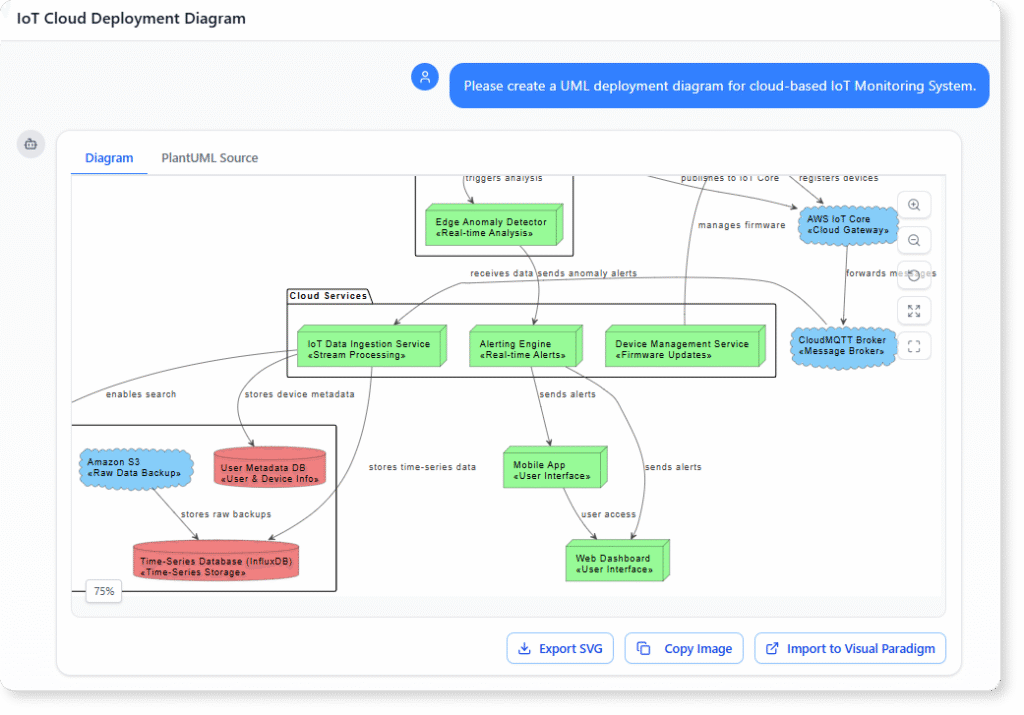
🎯 चरण 1: अपने सिस्टम का सरल अंग्रेजी में वर्णन करें
खोलें विजुअल पैराडाइग्म का एआई चैटबॉट और टाइप करें:
*”एक क्लाउड-आधारित ई-कॉमर्स सिस्टम के लिए यूएमएल डेप्लॉयमेंट डायग्राम बनाएं जिसमें:
वेब और API सर्वरों के लिए AWS EC2 इंस्टेंस,
आर्डर प्रोसेसिंग के लिए AWS Lambda,
उत्पाद और उपयोगकर्ता डेटा के लिए Amazon DynamoDB,
उत्पाद छवियों को संग्रहीत करने के लिए AWS S3,
ट्रैफिक रूटिंग के लिए एप्लीकेशन लोड बैलेंसर,
लोड बैलेंसर के सामने एक WAF फायरवॉल,
और भविष्य के माइक्रोसर्विसेज के लिए एक कुबरनेटीस क्लस्टर।”*
✅ परिणाम: 30 सेकंड से कम समय में, एआई पूरी तरह से सुसंगत यूएमएल डायग्राम उत्पन्न करता है जिसमें:
सही नोड स्टेरियोटाइप (
<<सर्वर>>,<<क्लाउड>>,<<कंटेनर>>,<<उपकरण>>)उचित
<<डेप्लॉय>>संबंधसंचार लिंक्स के साथ
<<HTTPS>>,<<TCP/IP>>सुरक्षा सीमाएँ (LB के सामने WAF)
नेस्टेड संरचना (EC2 के भीतर कुबरनेटेस)
🔗 इसके काम कैसे करता है, देखें: AI के साथ क्लाउड एप्लिकेशन के लिए UML डेप्लॉयमेंट डायग्राम कैसे बनाएं
🔄 चरण 2: बातचीत आधारित कमांड्स के साथ इटरेट करें
फिर से ड्रॉ करने की जरूरत नहीं। बस पूछें:
“DynamoDB के लिए मल्टी-रीजन रिप्लिकेशन जोड़ें ताकि उच्च उपलब्धता सुनिश्चित हो।”
✅ AI डायग्राम को अपडेट करता है: एक अलग AWS क्षेत्र में दूसरा DynamoDB नोड जोड़ता है, साथ में<<मल्टी-रीजन>>लेबल।
“डेटाबेस को प्राइवेट सबनेट के पीछे ले जाएं और एक VPC जोड़ें।”
✅ AI जोड़ता है<<VPC>>नोड, डेटाबेस को सार्वजनिक दृश्य से छिपाता है, और नेटवर्क अलगाव जोड़ता है।
“EC2 इंस्टेंस पर चल रहे कुबरनेटेस क्लस्टर को दिखाएं।”
✅ AI नेस्ट करता है<<कंटेनर>>क्लस्टर को<<सर्वर>>EC2 नोड में।
💬 यह है इटरेटिव, स्मार्ट डिज़ाइन—हाथ से संपादन नहीं।
🔗 डायनामिक अपडेट्स के बारे में अधिक जानें: विजुअल पैराडाइग्म के साथ डेप्लॉयमेंट डायग्राम्स पर व्यापक ट्यूटोरियल
📤 चरण 3: सहयोग के लिए निर्यात और साझा करें
संतुष्ट होने के बाद, अपने डायग्राम को कई फॉर्मेट में निर्यात करें:
-
PDF (दस्तावेज़ीकरण और प्रस्तुतियों के लिए)
-
PNG/SVG (रिपोर्ट्स, विकी, स्लाइड्स के लिए)
-
HTML (इंटरैक्टिव वेब साझाकरण के लिए)
आप इसके अलावा भी कर सकते हैं:
-
इसे कंपोनेंट डायग्राम्स से जोड़ें (यह दिखाता है कि कोड रनटाइम के लिए कैसे मैप होता है)।
-
C4 या ArchiMate मॉडल्स के साथ एकीकृत करें (कंपनी स्तरीय संरचना के लिए)।
-
चैट इतिहास साझा करें अपनी टीम के साथ (पारदर्शिता और समन्वय के लिए)।
🔗 मुफ्त संस्करण का प्रयास करें: मुफ्त डेप्लॉयमेंट डायग्राम टूल – विजुअल पैराडाइग्म ऑनलाइन
🛠️ एडवांस्ड फीचर्स जो AI को और बेहतर काम करने में मदद करते हैं
विजुअल पैराडाइग्म केवल डायग्राम उत्पन्न नहीं करता—यह बुद्धिमत्ता के साथ उन्हें बढ़ाता है.
✅ 1. PlantUML इंटीग्रेशन
अपने डेप्लॉयमेंट मॉडल को निर्धारित करें PlantUML सिंटैक्स, फिर उसे तुरंत यूआई में दृश्य बनाएं।
उदाहरण:
@startuml
‘ वैकल्पिक: दृश्य शैली में सुधार (डेप्लॉयमेंट डायग्राम के लिए सिफारिश की गई)
skinparam nodesep 50
skinparam ranksep 50
‘ शीर्ष स्तर का क्लाउड कंटेनर (पूरे AWS परिवेश को समूहित करता है)
cloud “AWS क्लाउड” के रूप में AWS {
‘ AWS के भीतर लोड बैलेंसर नोड
node “लोड बैलेंसर” के रूप में LB <<लोड बैलेंसर>> {
‘ आमतौर पर किसी लोड बैलेंसर पर सीधे आर्टिफैक्ट डेप्लॉय नहीं किए जाते हैं
}
‘ नेस्टेड आर्टिफैक्ट के साथ EC2 वेब सर्वर नोड
node “EC2 वेब सर्वर” के रूप में EC2 <<सर्वर>> {
आर्टिफैक्ट “WebApp.jar” के रूप में WebApp
}
‘ डेटाबेस नोड
node “DynamoDB” के रूप में DB <<डेटाबेस>>
‘ स्टोरेज नोड
node “S3” के रूप में S3 <<स्टोरेज>>
}
‘ डेप्लॉयमेंट: आर्टिफैक्ट को EC2 नोड पर डेप्लॉय किया गया है
‘ (यदि पहले से नेस्टेड है तो यह वैकल्पिक है, लेकिन स्पष्ट होना स्पष्ट है)
WebApp –> EC2 : <<डेप्लॉय>>
‘ संचार मार्ग (रनटाइम कनेक्शन)
EC2 –> LB : <<HTTPS>> : क्लाइंट रिक्वेस्ट्स
LB –> EC2 : <<HTTPS>> : फॉरवर्ड किए गए रिक्वेस्ट्स ‘ आवश्यता होने पर द्विदिश
‘ पारंपरिक बैकएंड कनेक्शन (उदाहरण के लिए, एप्लिकेशन से डेटाबेस और स्टोरेज)
EC2 –> DB : <<JDBC / AWS SDK>>
EC2 –> S3 : <<HTTPS / AWS SDK>>
@enduml
🔗 इस शक्तिशाली विशेषता का उपयोग करें: PlantUML डेप्लॉयमेंट डायग्राम बिल्डर – विजुअल पैराडाइग्म इंटीग्रेशन
✅ 2. रियल-टाइम सहयोग
टीम सदस्यों को आराम से देखने, टिप्पणी करने या आराम से चित्र को सह-संपादित करने के लिए आमंत्रित करें—वितरित टीमों के लिए आदर्श।
🔗 सहयोग विशेषताएं देखें: विजुअल पैराडाइग्म सॉफ्टवेयर में डेप्लॉयमेंट डायग्राम विशेषताएं
✅ 3. स्वचालित सुझाव और उत्तम व्यवहार
AI सिर्फ चित्र नहीं बनाता—यह सलाह देता है.
-
“बेहतर सुरक्षा के लिए रिवर्स प्रॉक्सी जोड़ने पर विचार करें।”
-
“मल्टी-रीजन डेटाबेस प्रतिलिपि फेलओवर में सुधार करती है।”
-
“डेटाबेस को एक प्राइवेट सबनेट में रखें।”
ये सुझाव आपको महंगे डिज़ाइन दोषों से बचाते हैं।
🎯 उच्च प्रभाव वाले डेप्लॉयमेंट डायग्राम के लिए उत्तम व्यवहार
| टिप | यह क्यों महत्वपूर्ण है |
|---|---|
| उद्देश्य के साथ शुरुआत करें | आर्किटेक्चर-महत्वपूर्ण तत्वों पर ध्यान केंद्रित करें (जैसे: लोड बैलेंसर, फायरवॉल, डेटाबेस) |
| स्टेरियोटाइप का उपयोग करें | <<सर्वर>>, <<बादल>>, <<कंटेनर>> स्पष्टता में सुधार करें |
| मॉडल नेस्टिंग | कंटेनर को VMs के भीतर दिखाएं, VMs को भौतिक सर्वरों के भीतर दिखाएं |
| इसे परतदार रखें | परिवेशों (उत्पादन/स्टेजिंग) और परतों (फ्रंटएंड/बैकएंड) के लिए पैकेज का उपयोग करें |
| आवश्यकताओं के खिलाफ मान्यता प्राप्त करें | उच्च उपलब्धता, सुरक्षा और स्केलेबिलिटी को प्रतिबिंबित करने का ध्यान रखें |
| अतिरिक्त मॉडलिंग से बचें | हर छोटी फाइल को शामिल न करें—केवल वही जो आर्किटेक्चर पर प्रभाव डालता है |
🔗 पूर्ण गाइड देखें: विजुअल पैराडाइग्म उपयोगकर्ता गाइड: डेप्लॉयमेंट डायग्राम बनाना
💰 यह समय, पैसा और तनाव बचाता है क्योंकि
| चुनौती | पारंपरिक दृष्टिकोण | विजुअल पैराडाइग्म में एआई के साथ |
|---|---|---|
| डायग्राम निर्माण | 3–5 घंटे | 1 मिनट से कम |
| त्रुटि-प्रवण | हाथ से गलतियाँ आम हैं | एआई यूएमएल संगति सुनिश्चित करता है |
| पुनरावृत्ति | हर बार फिर से बनाना पड़ता है | चर्चा के माध्यम से अपडेट करें |
| टीम के समन्वय | साझा करना कठिन है | रियल-टाइम सहयोग |
| लागत | उच्च श्रम, पुनर्कार्य | कम ओवरहेड, कम विफलताएं |
💥 परिणाम: टीमें अन्वेषण कर सकती हैं एक ही दोपहर में 10+ आर्किटेक्चर विकल्प—जो हाथ से उपकरणों के साथ असंभव है।
🔗 लागत बचत प्रभाव को देखें: विजुअल पैराडाइम के साथ डेप्लॉयमेंट डायग्राम्स पर व्यापक ट्यूटोरियल
🎁 बोनस: खुद को आजमाएं – मुफ्त और कोई इंस्टॉलेशन की आवश्यकता नहीं
शुरुआत करने के लिए आपको लाइसेंस की आवश्यकता नहीं है।
👉 विजिट करें: मुफ्त डेप्लॉयमेंट डायग्राम टूल – विजुअल पैराडाइम ऑनलाइन
-
कोई इंस्टॉलेशन की आवश्यकता नहीं।
-
आपके ब्राउज़र में काम करता है।
-
पूर्ण एआई-संचालित डायग्राम उत्पादन।
-
PDF, PNG, SVG या HTML में निर्यात करें।
आदर्श उपयोग के लिए:
-
एक नए सिस्टम का परीक्षण करने वाले डेवलपर्स।
-
बादल डिज़ाइन के प्रोटोटाइप बनाने वाले वास्तुकार।
-
यूएमएल सीख रहे छात्र।
🎯 अंतिम विचार: सिस्टम डिज़ाइन का भविष्य एआई-संचालित है
डायग्रामिंग में घंटों बिताने के दिन खत्म हो गए हैं।
अब आप कर सकते हैं:
-
अपने सिस्टम का वर्णन प्राकृतिक भाषा में करें,
-
तुरंत पेशेवर, यूएमएल-संगत डायग्राम प्राप्त करें,
-
सरल आदेशों के साथ इसे सुधारें,
-
इसे अपनी टीम के साथ साझा करें,
-
इसे अन्य मॉडल्स से जोड़ें (कंपोनेंट, C4, ArchiMate)।
यह सिर्फ तेज़ नहीं है—यह बुद्धिमान, अधिक सटीक और अधिक सहयोगात्मक.
✅ विजुअल पैराडाइम का एआई डेप्लॉयमेंट डायग्राम जनरेटर बस एक उपकरण नहीं है।
यह आपका एआई सह-आर्किटेक्ट—आपको बेहतर प्रणालियों को तेजी से डिज़ाइन करने में मदद कर रहा है।
📌 सारांश: एआई-संचालित डेप्लॉयमेंट डायग्राम्स के लिए आपका गाइड
| विशेषता | विजुअल पैराडाइम कैसे इसे प्रदान करता है |
|---|---|
| 🚀 गति | सेकंडों में डायग्राम बनाएं |
| 🧠 बुद्धिमत्ता | एआई सर्वोत्तम व्यवहार और मानकों की सिफारिश करता है |
| 🤝 सहयोग | डायग्राम और चैट इतिहास साझा करें |
| 🔗 एकीकरण | प्लांटयूएमएल, सी4, आर्किमेट के साथ काम करता है |
| 📦 निर्यात | पीडीएफ, पीएनजी, एसवीजी, एचटीएमएल और अधिक |
| 💡 कोई इंस्टॉल नहीं | मुफ्त ऑनलाइन संस्करण उपलब्ध है |
🔗 इस ट्यूटोरियल में सभी संसाधन (आसान पहुंच के लिए एम्बेडेड)
-
डेप्लॉयमेंट डायग्राम क्या है? यूएमएल डेप्लॉयमेंट डायग्राम्स के लिए पूर्ण गाइड
-
एआई के साथ क्लाउड एप्लिकेशन के लिए यूएमएल डेप्लॉयमेंट डायग्राम कैसे बनाएं
-
UML में डेप्लॉयमेंट डायग्राम कैसे बनाएं: स्टेप-बाय-स्टेप ट्यूटोरियल
-
Visual Paradigm के साथ डेप्लॉयमेंट डायग्राम पर व्यापक ट्यूटोरियल
-
Visual Paradigm उपयोगकर्ता मार्गदर्शिका: डेप्लॉयमेंट डायग्राम बनाना
-
PlantUML डेप्लॉयमेंट डायग्राम बिल्डर – Visual Paradigm इंटीग्रेशन
-
Visual Paradigm ऑनलाइन का उपयोग करके डेप्लॉयमेंट डायग्राम के लिए बिगिनर्स गाइड
-
Visual Paradigm सॉफ्टवेयर में डेप्लॉयमेंट डायग्राम विशेषताएं
🚀 अपने आर्किटेक्चर वर्कफ्लो को बदलने के लिए तैयार हैं?
👉 अभी शुरू करें chat.visual-paradigm.com
👉 मुफ्त ऑनलाइन टूल का प्रयोग करें: मुफ्त डेप्लॉयमेंट डायग्राम टूल – Visual Paradigm ऑनलाइन
चाहे आप एक स्टार्टअप एमवीपी बना रहे हों, विश्वव्यापी क्लाउड प्लेटफॉर्म का डिज़ाइन कर रहे हों, या UML सिखा रहे हों—AI आपके सिस्टम डिज़ाइन में आपका नया को-पायलट है.
🌟 बुद्धिमानी से डिज़ाइन करें। तेज़ी से बनाएं। आत्मविश्वास के साथ डेप्लॉय करें।
डेप्लॉयमेंट डायग्राम का भविष्य यहाँ है—और यह AI द्वारा संचालित है.